Phase 1 — What it is, and how it fits together#
6 lessons · Level: beginner
This phase tells you what VirtFusion does, how it is arranged inside, and what each word means.
What is in this phase#
| Lesson | What you learn |
|---|---|
| 1 — What VirtFusion is, and the problem it solves | The layer VirtFusion adds on top of plain KVM, and what it leaves to you |
| 2 — The control server and the hypervisor | What each part does, and the port they speak on |
| 3 — The words you need | The words that come back in the other six phases |
| 4 — Licences and what they cost | One key for each cluster, and a VM limit for each node |
| 5 — The ports you must open | Which port must be open, and in which direction |
| 6 — VirtFusion or Proxmox: a first look | Where the purpose of the two products differs |
Lesson 1 — What VirtFusion is, and the problem it solves#
Bro, what is this? Ok so basically: KVM can already cut a server into VPS. What it cannot do is give your customers a panel, hand out IPs, count bandwidth, or talk to your billing system. VirtFusion is that missing layer. It sits on top of KVM. It is not a hypervisor itself.
In plain words#
You have a bare-metal server. You want to divide it into VPS and sell them.
You can do this with KVM alone. Then you must build everything yourself: the customer panel, IP allocation, OS templates, bandwidth accounting, the VNC console, and the billing connection.
VirtFusion gives you that layer. It is not a hypervisor itself. Plain Linux KVM runs below it, with libvirt and QEMU. VirtFusion sits on top and gives management, a panel, and an API.
What it gives you#
| It gives | What that means |
|---|---|
| Two panels | One for the administrator, one for the customer |
| The VM lifecycle | Create, build, start, stop, rebuild, resize, delete |
| IP management | IPv4 and IPv6 blocks, automatic allocation, rDNS |
| OS templates | Linux and Windows templates, based on cloud-init |
| A console | VNC in the browser, with no SSH |
| Traffic accounting | Bandwidth count and limit for each server |
| Backups | Incremental backups, with more than one storage backend |
| A billing connection | Modules for 7 billing systems, WHMCS among them |
| An API | A full REST API. You can script every task |
What it does not give you#
- It does not do the billing. Invoices, payment gateways, and tax belong
to a separate system. The one exception is the hourly credit in Self Service. See phase 6.
- It does not run containers. There is no LXC and no Docker, only full VMs.
- It does not configure network switches. VLANs and routing stay your work.
Lesson 2 — The control server and the hypervisor#
Bro, what is this? Ok so basically: VirtFusion comes in two pieces. The control server is the brain, and it runs zero VMs. The hypervisor is the muscle, the bare metal where customer VMs actually live. One control server per cluster, as many hypervisors as you want. Miss this split and nothing else in these docs makes sense.
In plain words#
VirtFusion installs in two parts. If you do not understand this division, the rest stays unclear.
| Part | What it runs | How many you need |
|---|---|---|
| Control server | The web panel, the API, the database, the task queue | One. It defines the cluster |
| Hypervisor | KVM, libvirt, and the real VMs | As many as you want, in as many places as you want |
The control server runs no VM. It only gives instructions. The hypervisor obeys the instructions and reports the result.
"One for each cluster" does not mean one for each region#
A cluster is one control server and every hypervisor it manages. The control server defines the cluster. Nothing about geography does.
So one control server can manage nodes in Singapore, Frankfurt, and Dallas at the same time. That is still one cluster, and one licence. You separate the locations with hypervisor groups, and the customer chooses a group at checkout.
You add a second control server only when you want a second, independent cluster — for latency you can measure, for failure isolation, or because a law says the data stays in one country. A second cluster is a second licence.
Note: Phase 5, lesson 5 covers the part that follows from this. If you do run more than one cluster, each one has its own base URL and its own API token, and your application must record which cluster each server belongs to.
How they talk to each other#
customer browser ──443──▶ control server
                               │
                               │ 8892 (HTTPS, both directions)
                               ▼
                       hypervisor 1 … n
                               │
customer browser ──5900+───────┘ (VNC console)- The control server sends work to the hypervisor on port 8892.
- The hypervisor reports back on the same port. Open it in both directions.
- The VNC console goes from the customer browser straight to port 5900+
on the hypervisor.
Both on one machine?#
This works for a test, but it is not advised. With NAT it does not work at all, because the proxy ports collide. See phase 3, lesson 4.
Lesson 3 — The words you need#
Bro, what is this? Ok so basically: this is the vocabulary list. Do not memorise it. Just know it is here, because the next six phases use these exact words and each one means one specific thing.
KVM, hypervisor, VM — what is what#
These three words get thrown around like they mean the same thing. They do not, and mixing them up makes everything after this harder than it needs to be.
KVM is not a program you run. It is a module inside the Linux kernel that lets one physical CPU pretend to be many. It has shipped with Linux since
- It is either available on a machine or it is not, and that comes down to
whether VT-x (Intel) or AMD-V (AMD) is switched on in the BIOS. No VT-x or AMD-V means no KVM, and no amount of configuration talks you out of that.
QEMU is the program that pretends to be the hardware — the disk, the network card, the screen. One QEMU process per VM. On its own QEMU is slow, because it emulates a CPU in software. Put it together with KVM and the guest runs its instructions on the real CPU at close to native speed. That pairing is what people mean when they say "KVM virtualization".
libvirt is the manager. It is the daemon that defines, starts, stops and inspects those QEMU processes, and virsh is its command line. When the control server is down and you SSH into a node to reboot a customer VM by hand, libvirt is what you are actually talking to.
A hypervisor is not software here. It is the machine. One bare-metal box running the kernel with KVM, plus QEMU, plus libvirt, plus the VirtFusion agent. In the panel, "Hypervisor" means exactly that: one physical node in your rack.
A VM is one guest. Its own kernel, its own operating system, its own IP, its own root password. VirtFusion calls it a Server. When you sell it, you call it a VPS. Three names, one object.
And VirtFusion is none of the above. It is the layer that tells the hypervisors what to do and gives your customers somewhere to press buttons. It runs no VM itself.
| Word | What it actually is | Where it lives |
|---|---|---|
| KVM | A Linux kernel module that gives real CPU virtualization | Inside the kernel of each hypervisor |
| QEMU | The program that emulates the hardware of one guest | One process for each VM, on the hypervisor |
| libvirt | The daemon that defines, starts, and stops guests | On the hypervisor. virsh is its CLI |
| Hypervisor | The bare-metal machine that runs all three together | Your rack |
| VM (Server, VPS) | One guest, with its own OS and its own IP | Inside a hypervisor |
| VirtFusion | The panel and the API that command the hypervisors | The control server |
One more that catches people out: a container (LXC, Docker) is not a VM. A container shares the kernel of its host. A VM brings its own. VirtFusion runs VMs only. If you need containers, that is Proxmox, and phase 7 compares the two.
In plain words#
Every object in VirtFusion has one exact name. You do not have to learn this table, but come back to it. The other six phases use these words.
| Word | What it means |
|---|---|
| Hypervisor | One bare-metal node, where the VMs run |
| Cluster | One control server and every hypervisor it manages. It can span regions |
| Hypervisor Group | A set of hypervisors. Usually one location is one group |
| Server Distribution | The rule for which node inside a group gets a new VM |
| Package | A resource plan: vCPU, RAM, disk, traffic, and a number of IPs |
| Server | One VM |
| Template | An OS image, ready for cloud-init, that a server is built from |
| Media | Where the templates and the ISO files are kept |
| IP Block | An IPv4 or IPv6 range that is allocated to a hypervisor |
| User | A customer account |
| extRelationId | The user id in your own system, joined to a VirtFusion user |
| Provisioner | A script that runs at first boot (bash, python, or cloud-init) |
| Queue / Task | Background work. Builds, reboots, and backups all queue here |
| Self Service | The arrangement where a customer makes and deletes servers |
| Resource Pack | The resource quota a customer gets for Self Service |
| Asset | Hardware such as a GPU or a USB device, passed through to a VM |
| Elevate | A temporary change to a server, to commit or to discard later |
extRelationId — the most important idea here#
Put the user id from your own application, or from WHMCS, into VirtFusion as the extRelationId. Then you do not have to remember the internal VirtFusion user id. You can find the user with your own id:
GET /api/v1/users/{your-system-user-id}/byExtRelationRule: Do not keep the VirtFusion user id as the primary key in your own database. Between your id and the VirtFusion user,
extRelationIdis the only reliable link. If a user is deleted and made again, the internal id changes. Your id does not.
Lesson 4 — Licences and what they cost#
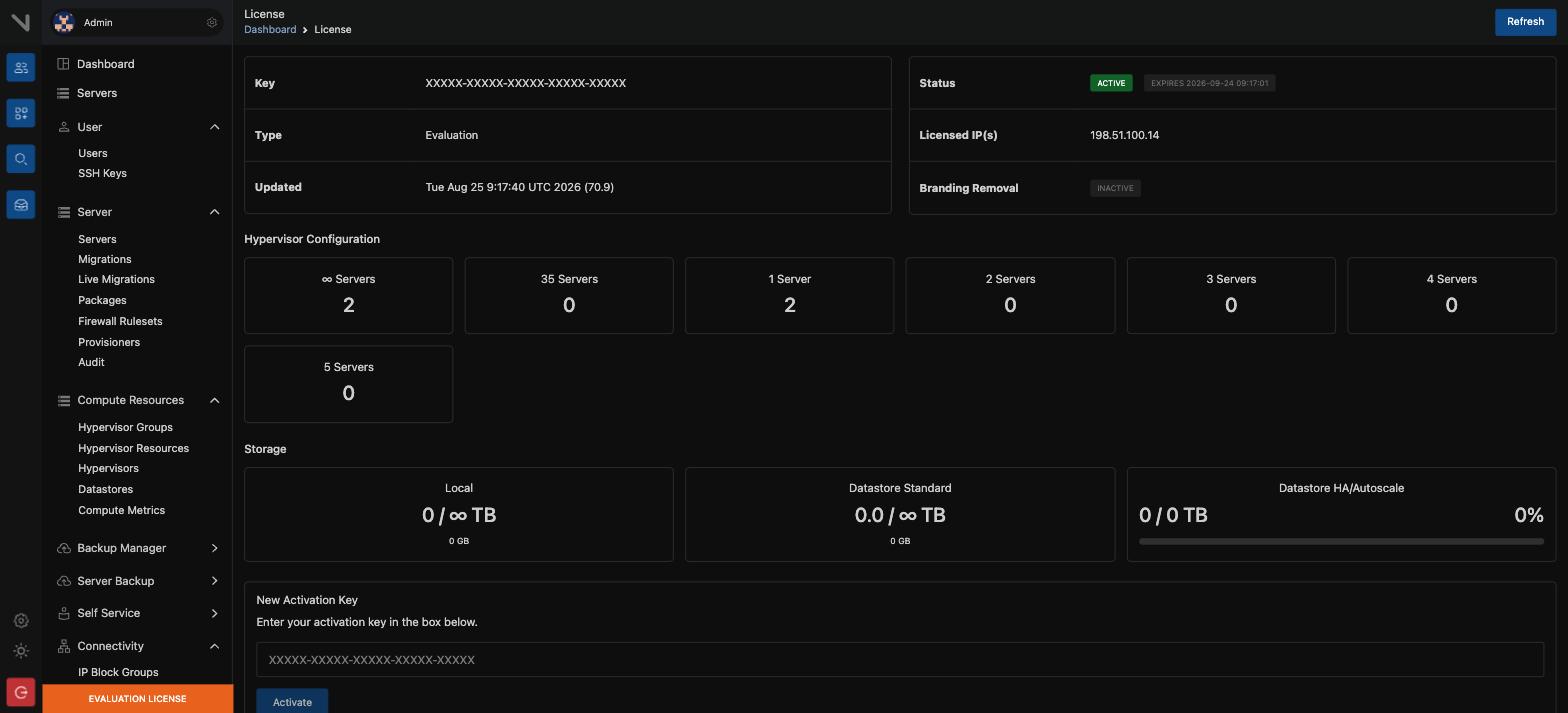
Bro, what is this? Ok so basically: one key covers the whole cluster and it is locked to the control server. But every hypervisor needs a tier that caps how many VMs it can run, and you can mix tiers. Unlimited on the big node, 5 on the little test box.
In plain words#
One licence covers one cluster. It is tied to the control server. However many hypervisors you have, you need only one key. But you must choose a tier for each hypervisor.
| Tier | Maximum VMs on that hypervisor |
|---|---|
| Unlimited | No limit |
| 35 servers | 35 |
| 5 servers | 5 |
| 1 server | 1 |
| Branding Removal | Removes VirtFusion branding. This is an add-on |
You can use different tiers together under one licence. For example, use Unlimited on a large node and 5 on a small test node.
Practical points#
- You can upgrade or downgrade at any time from the account portal, if no
invoice is unpaid.
- The licence locks to the control server. To move it to a new server you
must re-issue it, and the number of re-issues is limited.
- If you open more than one account with the same details, the accounts can be
cancelled automatically.
CAUTION: Keep NTP running on the control server. If its clock is more than 60 seconds away from real time, licence validation fails. Compare the time with
chronycorntpdate.
Lesson 5 — The ports you must open#
Bro, what is this? Ok so basically: 80 and 443 into the control server, 8892 both directions to each hypervisor, and 5900+ for the consoles. The point is that UFW is already running on every hypervisor. That is the thing that quietly kills VM internet and makes you doubt your network.
The port list#
| Component | Port | Protocol | Direction | Purpose |
|---|---|---|---|---|
| Control server | 80 | HTTP | Inbound | Get the SSL certificate (ACME) |
| Control server | 443 | HTTPS | Inbound | The panel and the API |
| Hypervisor | 8892 | HTTPS | Both directions | Control server to hypervisor traffic |
| Hypervisor | 5900+ | VNC | Inbound | The console. One port for each session |
UFW is installed and running on the hypervisor by default. Remember this when you add rules.
CAUTION: If a VM has no internet but the host does, UFW is blocking the routed packets. This is the most common cause. Correct it on the hypervisor:
BASHufw default allow routed
Common mistakes#
- Port 8892 is open in one direction only. The hypervisor never shows as
"commissioned".
- Ports 5900+ are blocked. The console shows a black screen.
- The IP of the control server changed and the hypervisor does not know. Every
call returns a 401 error. Phase 7, lesson 3 corrects this.
Lesson 6 — VirtFusion or Proxmox: a first look#
Bro, what is this? Ok so basically: both run KVM, so the question is not which one is stronger. It is what you are doing. Selling VPS to customers is VirtFusion. Running your own servers is Proxmox. That is the whole decision.
In plain words#
Both run KVM. The difference is the purpose.
| VirtFusion | Proxmox VE | |
|---|---|---|
| Who it is for | Hosting providers, many tenants | System administrators, your own infrastructure |
| Customer panel | Yes, from the start | No. Everyone sees the administrator UI |
| Containers | No | Yes, LXC |
| Storage | local, Ceph, StorPool, Lightbits, remote FS | LVM, ZFS, Ceph, NFS, iSCSI |
| Clustering | Control server and nodes. No quorum needed | Corosync quorum, QDevice |
| HA failover | No. If a node fails, recovery is manual | Yes, but it needs fencing |
| Billing connection | Modules for 7 billing systems | None |
| Licence | Commercial, one for each cluster | Free. A subscription is optional |
In short: to sell VPS, use VirtFusion. To run your own servers, use Proxmox. The full comparison and the migration path are in phase 7.
At the end of phase 1 you can#
- Separate what VirtFusion gives you from what it does not
- Say what the control server does, and what the hypervisor does
- Give the meaning of each of the main words
- Explain how a licence is counted
- Say which port is needed, and why
Next: Phase 2 — Installation